In 2026, many Nigerian businesses still rely on manual invoicing, leading to lost receipts, delayed payments, and endless hours chasing customers. Imagine the frustration of sifting through notebooks or deciphering scattered WhatsApp chats just to confirm a payment, especially when managing installment sales for properties, vehicles, or equipment. This outdated approach doesn't just cost time; it costs money and damages customer trust.
 Nigerian small business owner looking at a tablet
The Modern Nigerian Business Landscape and the Need for Automation
The Nigerian market is dynamic, with installment sales becoming a cornerstone for sectors like real estate, car dealerships, and solar equipment leasing. Businesses are constantly seeking ways to streamline operations, reduce overheads, and enhance customer experience. Manual processes for invoicing and payment reminders are no longer sustainable. A recent survey showed that businesses automating their customer communications experienced a 30% reduction in late payments and a 20% increase in customer satisfaction by 2025. The shift towards digital solutions isn't just a trend; it's a necessity for survival and growth in a competitive environment. From real estate developers in Abuja tracking property payments to cooperative societies managing member contributions, the demand for efficient installment management software Nigeria is at an all-time high. The ability to send digital invoices and payment reminders directly to customers via their preferred communication channel, like WhatsApp, is a game-changer. This not only speeds up payment collection but also builds transparency and trust, crucial for long-term client relationships.
What You Need Before You Start
Before diving into automating your WhatsApp invoicing, ensure you have these foundational elements in place:
- A Reliable Smartphone or Laptop: Essential for managing your operations. A decent smartphone can cost between ₦60,000 and ₦150,000, while a reliable laptop ranges from ₦150,000 to ₦300,000.
- Stable Internet Connection: Consistent access is key for any online automation. Monthly data plans typically cost ₦3,000 to ₦10,000, depending on usage.
- WhatsApp Business API Access: This is crucial for automation beyond basic messaging. The one-time setup fee can be ₦15,000 to ₦50,000, with a monthly subscription of ₦5,000 to ₦25,000 for basic messaging and invoicing features.
- Payment Gateway Account: To receive payments seamlessly. While some offer free integration, others might charge a one-time fee of up to ₦10,000. Transaction fees typically range from 1.5% to 2.5% + ₦50-₦100 per transaction.
- Clear Invoicing Procedures: Define your payment terms, due dates, and late payment policies.
- Branding Elements: Your company logo and brand colours for professional, customized invoices. A custom invoice template design can cost between ₦10,000 and ₦40,000.
Step-by-Step: Automate WhatsApp Invoicing
Automating your invoicing and payment reminders via WhatsApp can transform how you manage customer relationships and cash flow. Here’s how to set it up effectively.
Step 1: Secure Your WhatsApp Business API Access
The standard WhatsApp Business App is great for small-scale communication, but for true automation, especially for businesses with many clients and installment plans, you need the WhatsApp Business API. This allows integration with business software to send automated messages, notifications, and invoices.
To get started, you'll need to work with a WhatsApp Business Solution Provider (BSP). These providers help you register your business with Meta (WhatsApp's parent company) and set up your API access. The cost for this typically involves a one-time setup fee and a monthly subscription based on your messaging volume. While the initial investment might seem significant, consider it an investment in efficiency. The ability to send automatic notifications – new client, new contract, payment received, and payment reminders – directly via WhatsApp is invaluable for businesses like car dealers selling on hire purchase or real estate developers.
Step 2: Choose and Integrate a Contract and Installment Management System
This is the core of your automation strategy. A robust system will handle client data, contract terms, payment schedules, and trigger your automated WhatsApp messages. Look for a solution that specializes in contract management software Nigeria and real estate payment tracking Nigeria, or is suitable for cooperative society management software needs.
Your chosen system should allow you to:
- Register and manage clients: Store full client details and view complete payment history per client.
- Register and manage assets: Track items like cars, properties, or equipment, linking them directly to contracts.
- Create contracts: Define payment terms once, and let the system generate installment schedules automatically.
- Record payments: Log single payments against any contract with a full history.
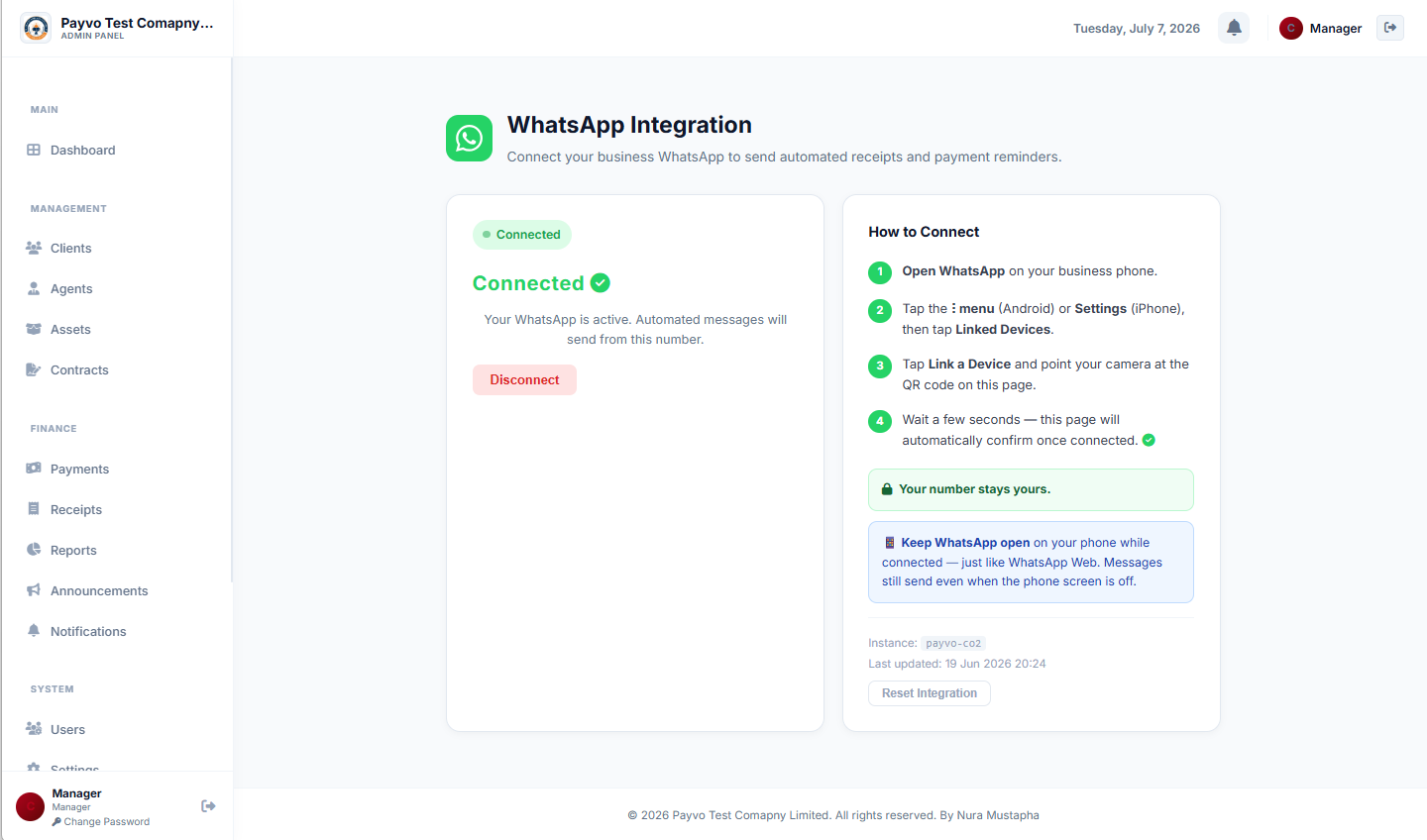 Admin: Whatsapp Integration
A system like Payvo, for instance, is designed for companies that sell on installment, offering comprehensive tools for client, asset, and contract management. It integrates seamlessly with WhatsApp, allowing you to send automated messages directly from the platform. For businesses looking for an all-in-one business payment tracking app Nigeria, this integration is critical. You can learn more about its features and capabilities on the Features Page.
Step 3: Customize Your Invoice and Receipt Templates
Professionalism matters. Your invoices and receipts should reflect your brand. Most installment management software will allow you to customize templates with your company logo, colours, and even a digital signature. This ensures that every document sent to your client reinforces your brand identity and looks credible.
When a payment is recorded, the system should automatically generate a branded receipt. This includes a master receipt for full contracts and individual receipts for each payment. This feature is crucial for transparency and customer trust. Clients appreciate receiving clear, professional documentation for their transactions.
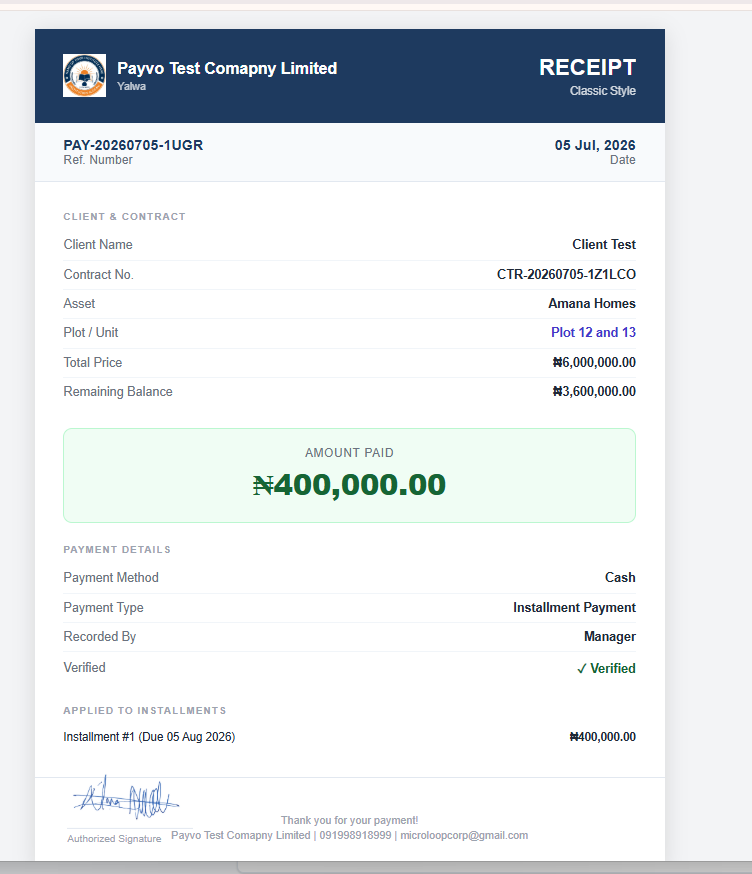 Finance: Paymnet Receipt Sample
Step 4: Configure Automated Payment Reminders and Notifications
This is where the true power of automation shines. Set up your system to send automated reminders before due dates. This eliminates the need for manual follow-up calls, saving significant time and reducing the chances of missed payments. You can configure reminders for various stages:
- Pre-due date reminders: A few days before an installment is due.
- On-due date reminders: On the day the payment is expected.
- Post-due date reminders: For overdue payments, with escalating urgency.
Step 5: Implement Agent and Staff Management (If Applicable)
If your business utilizes agents or multiple staff members, your system should support their management within the automated workflow. This means:
- Staff Accounts: Add staff with role-based permissions, controlling what each person can see and do. This is vital for data security and operational efficiency.
- Agent Commission Tracking: Assign agents to contracts, automatically calculate commission per payment, and track full earnings and payout history. This eliminates manual commission calculations, a common source of error and dispute.
- Agent Self-Tracking: Allow agents to log in with a code to view their own earnings and submit withdrawal requests directly, with managers notified instantly. This empowers your agents and streamlines the commission payout process.
Step 6: Monitor and Analyze Performance with Dashboards and Reports
Automation isn't a set-it-and-forget-it solution. You need to monitor its effectiveness. Your chosen software should provide real-time dashboards and comprehensive reports.
- Real-time Dashboards: At a glance, see total clients, active contracts, amount collected, outstanding balances, and next payment due. This provides a snapshot of your business health.
- Reports: Generate detailed reports (PDF or Excel) for payment and contract data, essential for accounting and record-keeping.
- Weekly Company Reports: Automatic email summaries covering key business performance metrics.
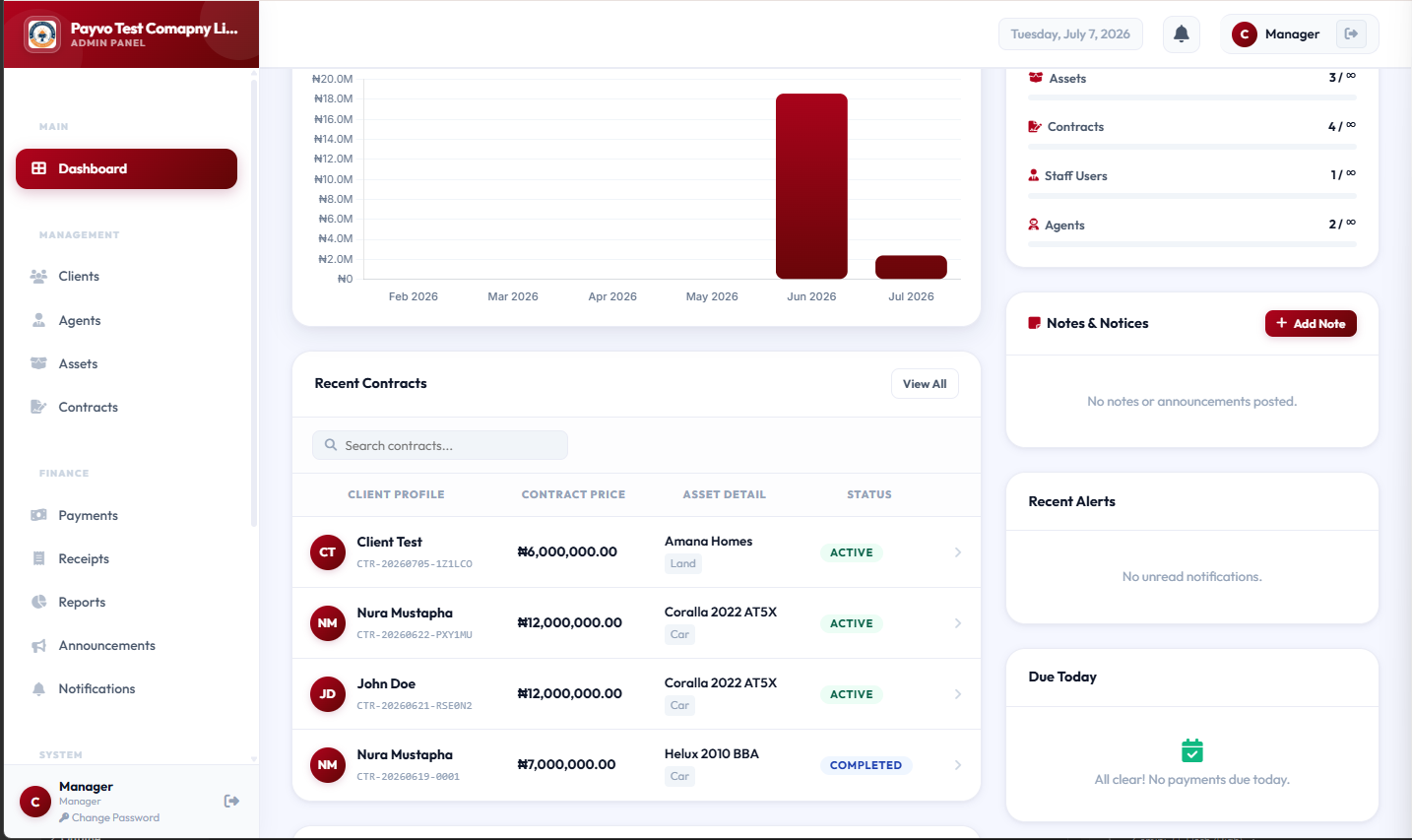 Dashobard (top)
These analytical tools help you understand payment trends, identify potential issues, and make informed business decisions. For example, if you notice a pattern of late payments for a specific type of installment, you can adjust your reminder strategy. This continuous feedback loop is crucial for optimizing your automated invoicing process and ensuring the long-term success of your digital invoicing Nigeria efforts.
> "The future of business efficiency in Nigeria isn't just about going digital; it's about intelligent automation that frees up entrepreneurs to focus on growth, not paperwork."
Common Mistakes to Avoid
Automating your WhatsApp invoicing can be incredibly beneficial, but watch out for these pitfalls:
- Ignoring WhatsApp Business API: Relying solely on the standard WhatsApp Business app for large-scale automation will quickly lead to limitations, manual workarounds, and potential account restrictions.
- Poorly Defined Payment Terms: If your contracts aren't clear about payment amounts, due dates, and late fees, automation will only amplify confusion, not solve it.
- Over-Automating without Personalization: While automation is key, ensure your messages still sound professional and human. Generic, robotic messages can alienate customers.
- Neglecting Data Privacy: Always ensure your system and processes comply with data protection regulations. Sending sensitive financial information requires secure channels. Review the Privacy Policy Page of any service you use.
- Not Testing Thoroughly: Before full deployment, test your automated workflows with a small group of clients or internally to catch any errors in message delivery, links, or payment processing.
- Ignoring Customer Feedback: Pay attention to how customers react to your automated messages. Are they clear? Are they annoying? Adjust your strategy based on their responses.
How to Track and Grow After Launch
Once your automated WhatsApp invoicing system is live, the work doesn't stop. Continuous tracking and growth strategies are essential for maximizing your investment.
Key Performance Indicators (KPIs) to Watch:
- Payment On-Time Rate: The percentage of payments received by their due date. A high rate indicates effective reminders and clear communication.
- Average Days Late: How many days, on average, payments are delayed. Aim to reduce this metric.
- Customer Satisfaction Score (CSAT): Gather feedback on your invoicing and payment processes. Happy customers are more likely to pay on time.
- Manual Follow-up Hours Saved: Track the time your staff previously spent chasing payments versus now. This quantifies your efficiency gains.
- Number of Active Contracts/Clients: Monitor your growth in business volume.
- Optimize Reminder Schedules: Experiment with different timing for your automated reminders. A reminder 3 days before a due date might work better than 5 days.
- Personalize Messages: Use client names and specific contract details in your automated messages to make them more engaging.
- Offer Flexible Payment Options: If your system allows, integrate various payment gateways to offer customers more ways to pay.
- Leverage Analytics: Use the reporting features of your installment management software Nigeria to identify trends. For example, if a particular asset type consistently has delayed payments, investigate why. Payvo's comprehensive dashboards and report generation capabilities allow you to export payment and contract data as PDF or Excel, providing the insights needed for strategic adjustments and growth. This continuous analysis is key to improving your WhatsApp payment notification system.
- Train Staff: Ensure all staff members, especially those interacting with clients or managing contracts, are fully trained on the new system. Consider one-time staff training which might cost ₦5,000 to ₦20,000. For businesses growing rapidly, you might even consider hiring a dedicated customer support staff member, with monthly salaries ranging from ₦40,000 to ₦80,000.
Frequently Asked Questions
Q1: Is WhatsApp Business API secure for sending financial information?
A1: Yes, the WhatsApp Business API is designed with security in mind, offering end-to-end encryption for messages. However, it's crucial that the installment management software Nigeria you integrate with also adheres to strong data security practices to protect client information. Always ensure you are using a reputable platform.
Q2: How much does it cost to implement automated WhatsApp invoicing?
A2: The costs vary. You'll need to factor in one-time setup fees for the WhatsApp Business API (₦15,000 - ₦50,000), monthly API subscriptions (₦5,000 - ₦25,000), potential payment gateway integration fees (up to ₦10,000), and the cost of your chosen contract management software Nigeria. A good internet connection (₦3,000 - ₦10,000 monthly) and reliable devices (₦60,000 - ₦300,000 one-time) are also essential.
Q3: Can I send invoices for installment payments to customers who don't use WhatsApp?
A3: While this guide focuses on WhatsApp, a comprehensive receipt generator app Nigeria or installment management system should offer alternative delivery methods. This could include email, SMS, or a secure client portal where customers can view and download their invoices and receipts. Many systems, for example, send a public receipt link clients can view, save, or share, which can be accessed via any browser.
Q4: Will automated reminders annoy my customers?
A4: Not if done correctly. The key is balance and clarity. Set up reminders that are helpful, not intrusive. A few well-timed, polite reminders are appreciated, especially for large installment payments like those for real estate or vehicles. Too many, or poorly worded, messages can be annoying. This is where the WhatsApp payment notification system needs careful configuration.
Q5: Can this system track agent commissions for sales?
A5: Absolutely. Many advanced installment management software Nigeria solutions include robust agent tracking features. They allow you to assign agents to specific contracts, automatically calculate their commission based on payments received, and track their earnings history. This is vital for businesses relying on sales agents, like car dealerships or real estate companies, and streamlines the process of agent commission tracking software.
Q6: What if a customer disputes an invoice sent via WhatsApp?
A6: The system should provide a clear audit trail for all invoices and payments. When a dispute arises, you can quickly access the client's full payment history, the original contract terms, and all communication logs. This transparency helps resolve disputes efficiently. A system like Payvo tracks everything securely with audit logs available for businesses needing deeper system oversight.
Ready to Streamline Your Business Operations?
The journey to efficient, automated invoicing via WhatsApp begins with the right tools and strategy. If you're ready to ditch manual tracking, reduce late payments, and enhance customer satisfaction, explore how a dedicated platform can help. Visit our Public Home Page to learn more, or Register into Payvo page to start transforming your business today.