Chasing down late installment payments is a relentless drain on resources, time, and morale. Businesses in Nigeria lose countless hours each week to manual follow-ups, phone calls, and tracking spreadsheets, all while struggling with inconsistent cash flow and strained client relationships. What if there was a way to ensure payments arrive on time, every time, without the constant manual effort?
The Critical Need for Automation in Installment Sales in 2026
The landscape for businesses offering installment sales in Nigeria is more competitive and dynamic than ever in 2026. From real estate developers in Abuja to car dealers in Kano and Kaduna, and even solar equipment leasing companies, managing numerous contracts and payment schedules manually has become an unsustainable practice. According to a 2025 report by the National Bureau of Statistics, over 60% of small and medium-sized enterprises (SMEs) in Nigeria offering credit or installment plans cite payment collection as a major operational challenge, often leading to cash flow inconsistencies and reduced profitability. The demand for flexible payment options continues to rise, especially for high-value assets like property and vehicles, making efficient collection processes not just an advantage, but a necessity.
The digital transformation sweeping across various sectors means clients now expect streamlined, professional interactions. Businesses that rely on traditional methods like phone calls, handwritten reminders, or scattered WhatsApp messages risk appearing unorganised and losing client trust. This not only impacts current collections but also future sales and reputation. Furthermore, the sheer volume of transactions for cooperative societies or building material suppliers selling on credit necessitates a robust system to prevent errors, track outstanding balances, and ensure timely remittances. Businesses that embrace automation for tasks like payment reminders are better positioned to scale, maintain healthy cash flow, and enhance customer satisfaction, setting them apart in a crowded market.
What You Need Before You Start
Before diving into setting up automated payment reminders, ensure you have the following prerequisites in place:
- Clear Payment Terms: Each contract or installment agreement must clearly outline payment amounts, due dates, and any grace periods or late fees. Ambiguity here will undermine any automated system.
- Centralized Client Data: A reliable, accessible database of all client contact information (names, phone numbers, email addresses) is essential. This forms the backbone for sending reminders.
- Defined Communication Channels: Decide whether you will primarily use email, SMS, or messaging apps like WhatsApp for reminders. Most effective systems leverage a combination.
- Dedicated Staff (Initially): While automation reduces manual work, you'll need at least one staff member to oversee the initial setup, monitor the system, and handle exceptions.
- Understanding of Local Regulations: Be aware of any consumer protection laws or communication regulations regarding automated messages in Nigeria to ensure compliance.
- A System or Software: A robust contract management software Nigeria businesses can rely on is crucial for integrating client data, contract terms, and automated messaging.
 A sleek 3D illustration of a business dashboard displaying payment metrics and automated reminder schedules, with a professional blue and green color palette. The mood is modern and trustworthy, composed using the rule of thirds with ample negative space.
Step-by-Step: Setting Up Automated Payment Reminders
Implementing an effective automated payment reminder system involves several key stages, from initial data setup to fine-tuning your communication strategy.
Step 1: Centralize Client and Contract Data
The foundation of any successful automated system is accurate and accessible data. Begin by compiling all your client information and contract details into a structured format. This includes client names, contact numbers, email addresses, the specific asset or service purchased (e.g., real estate property, car VIN, solar panel model), total contract value, installment amounts, and precise due dates.
If your data is currently scattered across spreadsheets, physical ledgers, or different messaging apps, consolidate it. This step is critical because any errors or omissions here will directly impact the effectiveness of your automated reminders. For businesses managing numerous clients and assets, a dedicated system is invaluable. Solutions like Payvo allow you to register and manage clients and store full client details and view complete payment history per client, alongside registering and managing assets, tracking items sold, and linking them directly to contracts. This central repository ensures all information is up-to-date and easily retrievable.
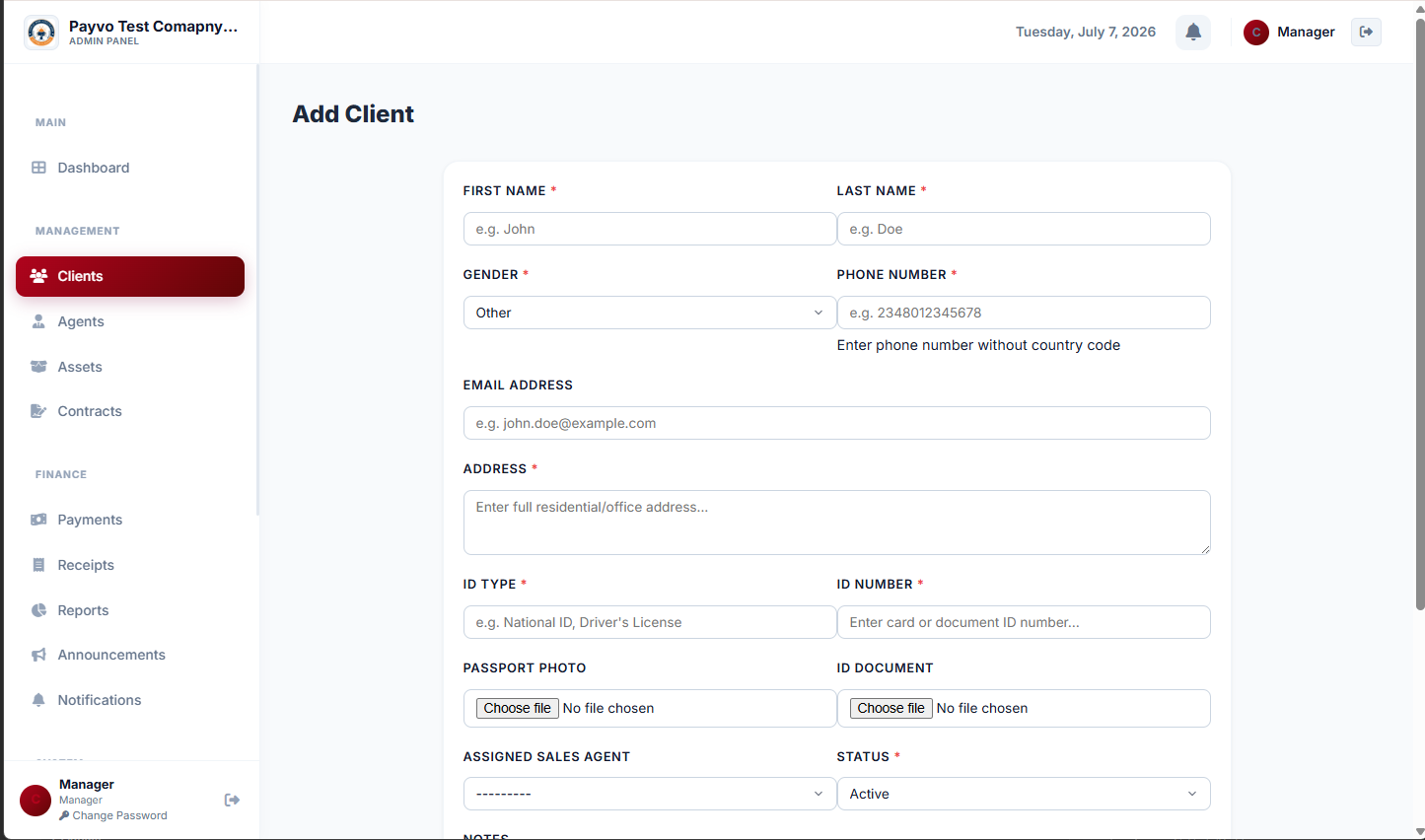 Client: Add Client page
Step 2: Define Your Reminder Schedule and Content
Once your data is centralized, determine the optimal timing and content for your payment reminders. A typical schedule might involve:
- Pre-due date reminder: 3-5 days before the payment is due. This serves as a gentle nudge.
- Due date reminder: On the day the payment is due, if not yet received.
- Post-due date reminders: 1-3 days after, and then weekly thereafter for overdue payments, adjusting frequency based on your policy.
- Client's name
- Payment amount due
- Due date
- Contract reference number
- Instructions on how to make the payment
- Contact information for queries
Step 3: Implement an Automated System
This is where automation truly comes into play. Instead of manually sending messages, you'll leverage technology to do the heavy lifting. A robust contract management software Nigeria businesses can utilize will allow you to set payment terms once, and installment schedules are generated automatically. This eliminates manual tracking and reduces the chance of human error.
The system should then automatically trigger reminders based on the schedule you defined in Step 2. Crucially, it should integrate with your chosen communication channels. Many modern platforms offer a WhatsApp payment notification system or email integration. Payvo, for example, is designed to send automatic notifications and payment reminders via both email and WhatsApp, including a public receipt link clients can view, save, or share. This ensures your clients receive timely prompts through their preferred channels, significantly reducing the need for manual follow-up calls and improving your payment collection rate.
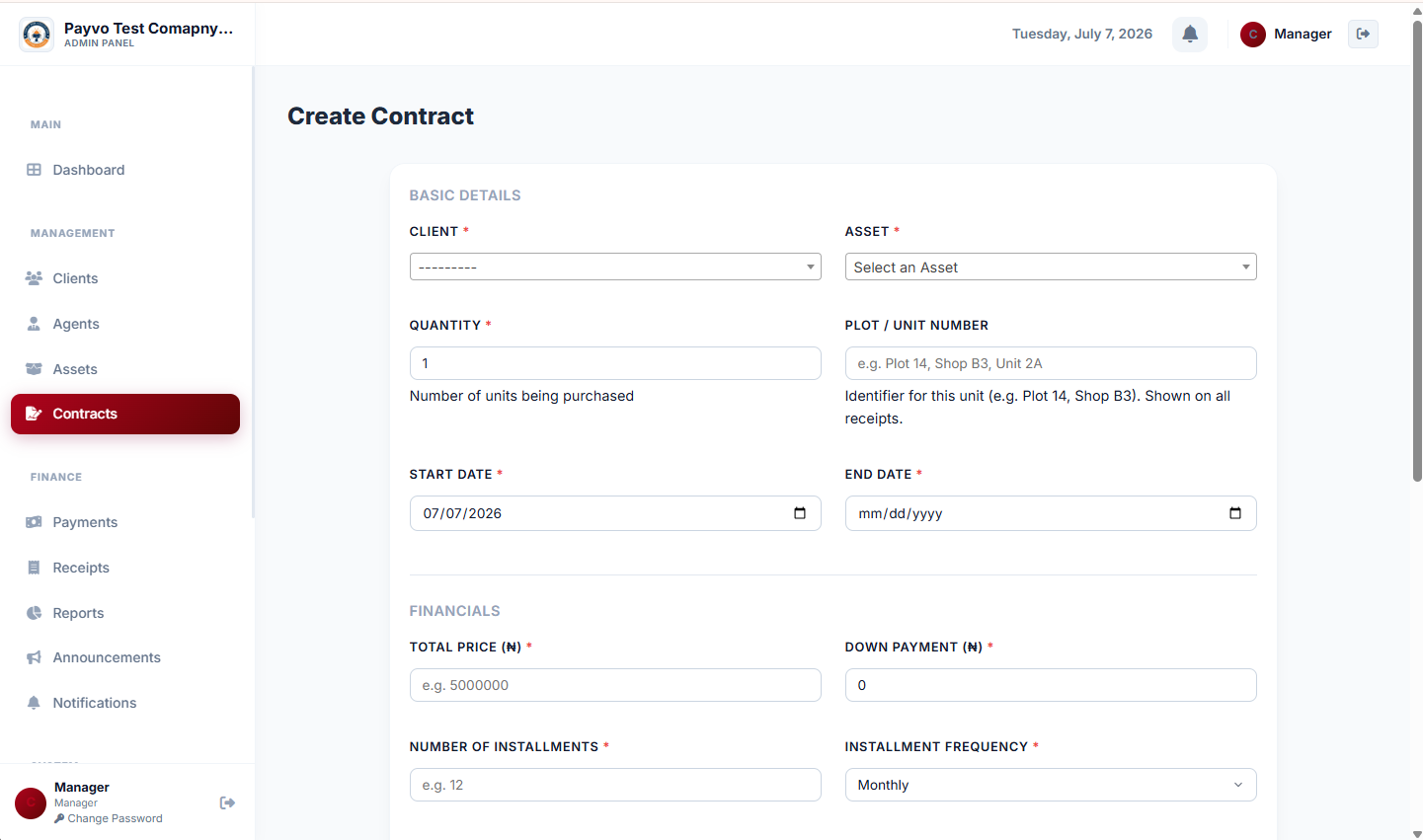 Management: Add contract (top)
Step 4: Configure Payment Recording and Receipt Generation
Automated reminders are only half the battle; you also need an efficient way to record payments and confirm receipt. Manually updating spreadsheets after each payment is time-consuming and prone to delays. Your automated system should facilitate quick and accurate payment logging.
When a payment is received, the system should allow you to record payments against the specific contract. This immediately updates the client's balance and stops any further automated reminders for that particular installment. Equally important is the automatic generation of receipts. Clients appreciate instant confirmation of their payments. The best systems can generate branded receipts (with your company logo, colors, and digital signature) automatically for every payment, plus a master receipt for full contracts. This not only builds trust but also provides a clear record for both parties.
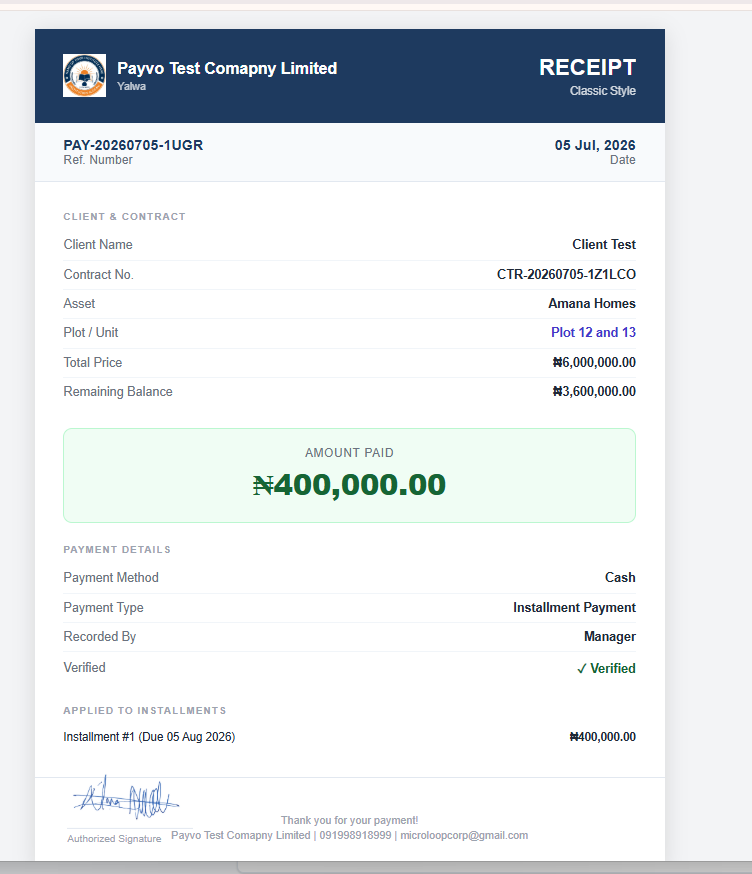 Finance: Paymnet Receipt Sample
Step 5: Set Up Staff Accounts and Agent Management
For businesses with multiple employees or a network of agents, managing access and commissions is vital. Automated payment reminders are part of a larger operational ecosystem. Ensure your chosen system allows you to manage staff accounts, assigning role-based permissions to control what each person can see and do. This prevents unauthorized access and ensures data integrity.
For real estate developers, car dealers, or any business utilizing agents, an agent commission tracking software integrated into your payment system is a game-changer. It should automatically calculate commission per payment, track full earnings, and manage payout history. Some advanced systems even offer agent self-tracking, where agents can log in to view their own earnings and submit withdrawal requests directly, streamlining the entire process. This level of integration ensures that while your reminders are automated, the entire back-end operation supports a smooth, transparent workflow.
Step 6: Test and Refine Your System
Before a full rollout, thoroughly test your automated reminder system. Create dummy client accounts and contracts, setting up various payment schedules and overdue scenarios.
- Test reminder delivery: Ensure emails are not going to spam and WhatsApp messages are being sent and received correctly.
- Verify content accuracy: Check that all dynamic fields (client name, amount, due date) are populating correctly.
- Confirm payment recording: Test recording a payment and ensure reminders cease for that installment.
- Gather feedback: If possible, do a pilot run with a small group of trusted clients and solicit their feedback on the clarity and timing of reminders.
Common Mistakes to Avoid
Even with the best intentions, businesses can fall into common traps when setting up automated payment reminders. Avoiding these pitfalls will ensure a smoother, more effective system.
- Over-reliance on a Single Channel: Sending reminders only via email or only via WhatsApp limits reach. A multi-channel approach (email, WhatsApp, SMS) is more effective as client preferences vary.
- Generic Messaging: Impersonal, boilerplate messages can be easily ignored. Personalize reminders with the client's name, contract details, and specific payment amount.
- Ignoring Local Time Zones/Holidays: Sending reminders at odd hours or on public holidays can be perceived as intrusive or unprofessional. Configure your system to account for these.
- No Grace Period or Follow-up for Overdue Payments: A single reminder isn't enough for overdue payments. Implement a structured follow-up sequence that escalates appropriately, including provisions for late fees if applicable.
- Failing to Update Records Promptly: If a client pays, but still receives an overdue reminder, it damages trust. Ensure your system instantly updates payment status and stops further reminders for paid installments.
- Neglecting Human Touch: While automation is key, there will always be situations requiring human intervention. Ensure there's a clear process for clients to contact a person if they have questions or need to discuss payment issues.
 Photorealistic editorial photography of a businesswoman looking thoughtfully at a tablet, surrounded by blurred financial graphs and data on transparent screens. The palette is professional and calm, with a serious but hopeful mood. Composition follows the rule of thirds.
How to Track and Grow After Launch
Launching your automated payment reminder system is just the beginning. Continuous monitoring and strategic growth are essential to maximize its impact.
Key Performance Indicators (KPIs) to Watch:
- Collection Rate: The percentage of due payments successfully collected within the grace period. This is your primary metric.
- Days Sales Outstanding (DSO): The average number of days it takes to collect payments after a sale. A lower DSO indicates better cash flow.
- Reminder Effectiveness: Track which types of reminders (email, WhatsApp, SMS) and which timing schedules yield the best results.
- Client Feedback: Monitor direct feedback from clients regarding the reminders. Are they helpful or annoying?
- Staff Time Saved: Quantify the hours your team previously spent on manual follow-ups versus now.
- A/B Test Reminder Content: Experiment with different subject lines, call-to-actions, and message wording to see what resonates best with your audience.
- Segment Reminders: Tailor reminders based on client segments (e.g., high-value clients, repeat defaulters) or product types.
- Integrate Payment Options: Explore integrating direct payment links within your reminders to make it even easier for clients to pay instantly.
- Leverage Reporting: A robust business payment tracking app Nigeria businesses can use will offer real-time dashboards showing total clients, active contracts, amount collected, outstanding balances, and next payment due at a glance. It should also generate reports, allowing you to export payment and contract data as PDF or Excel for accounting and record-keeping, and even receive weekly company reports via email covering key business performance metrics. This data is crucial for identifying trends and making informed decisions to optimize your collection strategy further. You can learn more about these analytical capabilities on Payvo's features page.
Frequently Asked Questions
Q1: Can automated reminders replace human interaction entirely?
A1: While automated reminders significantly reduce the need for manual follow-ups, they don't entirely replace human interaction. They handle the routine, timely prompts, freeing up your team to focus on more complex cases, client relationship building, or addressing specific payment issues that require a personal touch. The goal is to optimize, not eliminate, human involvement.
Q2: What if clients complain about receiving too many reminders?
A2: This often indicates an issue with your reminder frequency or content. Review your schedule (Step 2) and consider reducing the number of reminders, especially for early stages. Ensure your messages are polite and informative, not aggressive. Providing an easy way for clients to contact you with queries can also prevent frustration. A good system should allow for customisation to strike the right balance.
Q3: Is a WhatsApp payment notification system secure?
A3: Reputable installment management software Nigeria provides will integrate with WhatsApp's official business API, which includes encryption and security protocols. However, always ensure your chosen platform adheres to data protection best practices and local privacy regulations. Avoid sharing sensitive payment details directly in WhatsApp messages; instead, provide secure payment links. Payvo details its commitment to security on its privacy policy page.
Q4: How can I ensure my reminders are legally compliant?
A4: Compliance is crucial. Always be aware of consumer protection laws and any regulations regarding digital communication and debt collection in Nigeria. Ensure your terms and conditions clearly state your payment reminder policy. It's advisable to consult with a legal professional to verify your reminder content and frequency comply with all applicable laws.
Q5: Can this system handle different types of installment contracts, like varying payment dates or amounts?
A5: Yes, a robust contract management software Nigeria businesses can use is designed for this flexibility. When you create contracts, you should be able to set varied payment terms, including irregular schedules, different installment amounts, and specific due dates. The system then automatically generates the corresponding reminder schedule for each unique contract. This adaptability makes it suitable for diverse businesses like real estate, car dealerships, and cooperative societies.
Ready to Streamline Your Collections?
Are you tired of the endless chase for installment payments? It's time to transform your collection process from a manual burden into an automated, efficient engine for growth. Discover how a dedicated contract and installment management system can centralize your data, automate reminders, generate receipts, and empower your team. Take the first step towards consistent cash flow and happier clients. Register into Payvo today and experience the difference.